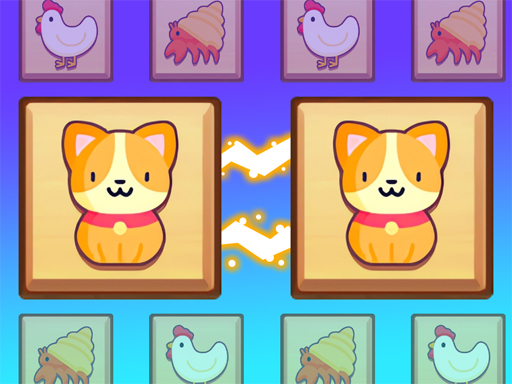
About Tile Connect Club
Tile Connect Club is a brain-training game that tests your linking skills. You have to connect tiles with different pictures in pairs and clear them all within a limited time. You can enjoy various pictures on the tiles, such as animals, fruits, flowers, and more. You can also play faster and faster to become a tile master. Tile Connect Club is a fun and addictive game that challenges your mind and eyes. If you are looking for some tile-connecting action, then download Tile Connect Club now!
Tile Connect Club belongs to the Puzzles category and is best for family-friendly casual play. GamPlayer keeps this page useful with a large play screen, quick facts, reporting and related games.
How to play Tile Connect Club
- Press Play now or scroll to the game screen.
- Wait for the embedded game to load from GameMonetize.
- Use mouse click or tap to play.
- Use fullscreen if the game needs extra space.
Tips for a better session
- Scan the whole board before making your first move.
- Slow decisions usually work better than rushed clicks.
- Share the page if you want an easy way back later.
 Puzzles
 Puzzles
 Puzzles
 Puzzles
 Puzzles
 Puzzles
 Puzzles
 Puzzles
 Puzzles
 Puzzles
 Puzzles
 Puzzles
 Puzzles
 Puzzles
 Puzzles
 Puzzles
 Puzzles
 Puzzles