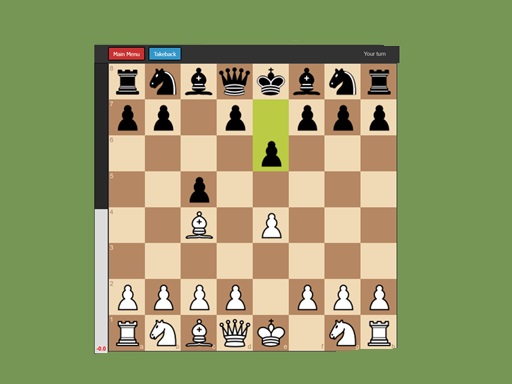
About AIchessgame
Play Chess against a powerful AI engine. Choose to play as White or Black, get real-time position evaluation, and use the Take back feature to undo moves. A clean, fast chess experience for all skill levels.
AIchessgame belongs to the Puzzles category and is best for calm thinking and replayable sessions. GamPlayer keeps this page useful with a large play screen, quick facts, reporting and related games.
How to play AIchessgame
- Press Play now or scroll to the game screen.
- Wait for the embedded game to load from GameMonetize.
- Use click a piece to select it then click the destination square to move legal moves are highlighted automatically use the take back button to undo your last move the eval bar on the left shows who is winning.
- Use fullscreen if the game needs extra space.
Tips for a better session
- Scan the whole board before making your first move.
- Slow decisions usually work better than rushed clicks.
- Share the page if you want an easy way back later.
 Puzzles
 Puzzles
 Puzzles
 Puzzles
 Puzzles
 Puzzles
 Puzzles
 Puzzles
 Puzzles
 Puzzles
 Puzzles
 Puzzles
 Puzzles
 Puzzles
 Puzzles
 Puzzles
 Puzzles
 Puzzles