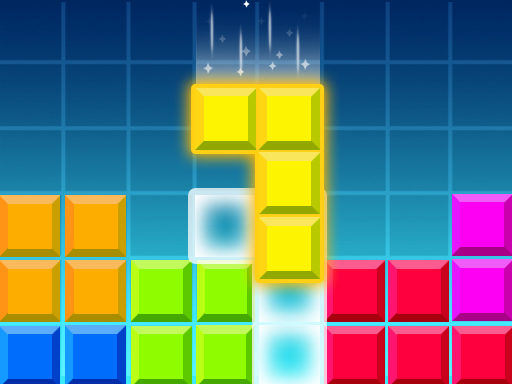
About Brick Game Classic
Brick Game Classic is a classic Tetris online game. If you are a fan of classic games, then this game that has been popular for many years is just right for you. When any row or column is filled, it is eliminated. You can change the shape of the cubes before they fall to eliminate them quickly. You can also make them fall faster if you are satisfied with their shape. Now join the world of fun games.
Brick Game Classic belongs to the Puzzles category and is best for calm thinking and replayable sessions. GamPlayer keeps this page useful with a large play screen, quick facts, reporting and related games.
How to play Brick Game Classic
- Press Play now or scroll to the game screen.
- Wait for the embedded game to load from GameMonetize.
- Use mouse click or tap to play.
- Use fullscreen if the game needs extra space.
Tips for a better session
- Scan the whole board before making your first move.
- Slow decisions usually work better than rushed clicks.
- Share the page if you want an easy way back later.
 Puzzles
 Puzzles
 Puzzles
 Puzzles
 Puzzles
 Puzzles
 Puzzles
 Puzzles
 Puzzles
 Puzzles
 Puzzles
 Puzzles
 Puzzles
 Puzzles
 Puzzles
 Puzzles
 Puzzles
 Puzzles