About Save My Pumpkin
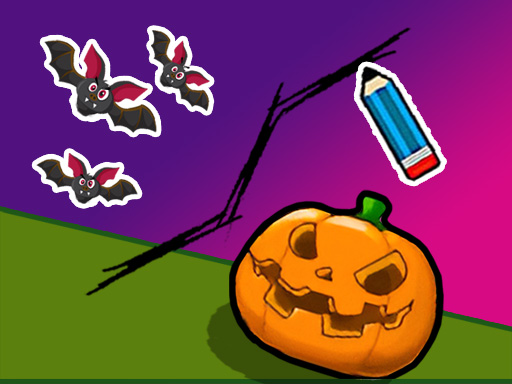
“Save My Pumpkin” is the second version of the popular game that has a Halloween theme and has made all the kids in the world fall in love with it. The gameplay consists of rescuing a creepy pumpkin with the help of drawing, which is in trouble. To test your drawing skills and create key resistances around the pumpkin, all you need to do is be careful and quick, because it is in great danger. Ready to save the spooky? Then let’s start!
Save My Pumpkin belongs to the Puzzles category and is best for family-friendly casual play. GamPlayer keeps this page useful with a large play screen, quick facts, reporting and related games.
How to play Save My Pumpkin
- Press Play now or scroll to the game screen.
- Wait for the embedded game to load from GameMonetize.
- Use touch the screen to draw a line hold on 10 seconds to prevent the bats from hurting pumpkin.
- Use fullscreen if the game needs extra space.
Tips for a better session
- Test acceleration and turning before chasing a perfect score.
- Fullscreen helps you see corners and obstacles earlier.
- Replay tracks to learn timing.
 Puzzles
 Puzzles
 Puzzles
 Puzzles
 Puzzles
 Puzzles
 Puzzles
 Puzzles
 Puzzles
 Puzzles
 Puzzles
 Puzzles
 Puzzles
 Puzzles
 Puzzles
 Puzzles
 Puzzles
 Puzzles