About Perfect Match
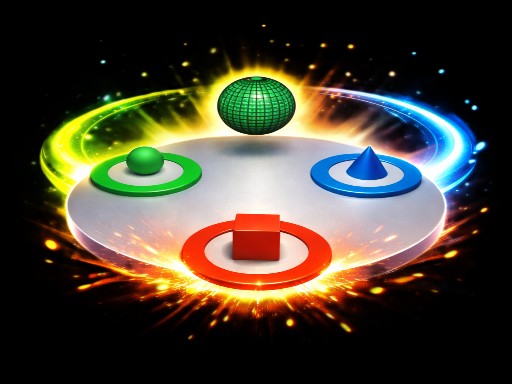
Rotate the platform and match the falling shapes to their correct colored zones before they land! Red cube goes to the Red zone. Green ball goes to the Green zone. Blue cone goes to the Blue zone. 20 levels of increasing difficulty — from Easy to Legend. How far can you go? Simple to learn, hard to master. Perfect for quick sessions!
Perfect Match belongs to the Hypercasual category and is best for quick browser entertainment. GamPlayer keeps this page useful with a large play screen, quick facts, reporting and related games.
How to play Perfect Match
- Press Play now or scroll to the game screen.
- Wait for the embedded game to load from GameMonetize.
- Use larr rarr arrow keys or a d mdash rotate platform p mdash pause f mdash fullscreen mobile tap left or right side of screen to rotate.
- Use fullscreen if the game needs extra space.
Tips for a better session
- Read the first in-game screen for controls.
- Try fullscreen if the game feels cramped.
- Use related games if this one is close but not perfect.
 Hypercasual
 Hypercasual
 Hypercasual
 Hypercasual
 Hypercasual
 Hypercasual
 Hypercasual
 Hypercasual
 Hypercasual
 Hypercasual
 Hypercasual
 Hypercasual
 Hypercasual
 Hypercasual
 Hypercasual
 Hypercasual
 Hypercasual
 Hypercasual