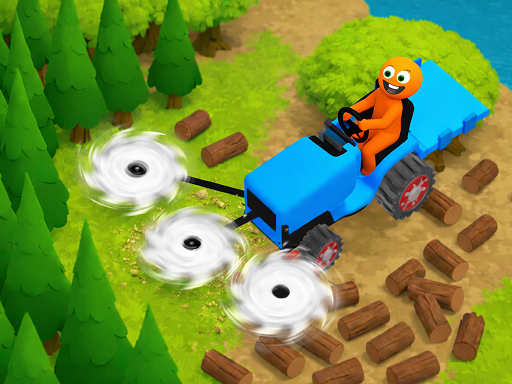
About Crazy Lumberjack: Cut Them All
What could be better than starting your morning by cutting down a whole clearing of trees and sending them off for processing? Play as a lumberjack on a tractor, chopping down different kinds of trees one by one, from firs to palms. Advance through levels, upgrade your tractor’s saws, trunk capacity, and speed, and compete against other players!
Crazy Lumberjack: Cut Them All belongs to the Hypercasual category and is best for speed, driving and reaction practice. GamPlayer keeps this page useful with a large play screen, quick facts, reporting and related games.
How to play Crazy Lumberjack: Cut Them All
- Press Play now or scroll to the game screen.
- Wait for the embedded game to load from GameMonetize.
- Use use your mouse or finger to control the tractor and cut down trees you can switch to collecting mode to gather firewood sell the wood and upgrade your tractor as you go.
- Use fullscreen if the game needs extra space.
Tips for a better session
- Read the first in-game screen for controls.
- Try fullscreen if the game feels cramped.
- Use related games if this one is close but not perfect.
 Hypercasual
 Hypercasual
 Hypercasual
 Hypercasual
 Hypercasual
 Hypercasual
 Hypercasual
 Hypercasual
 Hypercasual
 Hypercasual
 Hypercasual
 Hypercasual
 Hypercasual
 Hypercasual
 Hypercasual
 Hypercasual
 Hypercasual
 Hypercasual