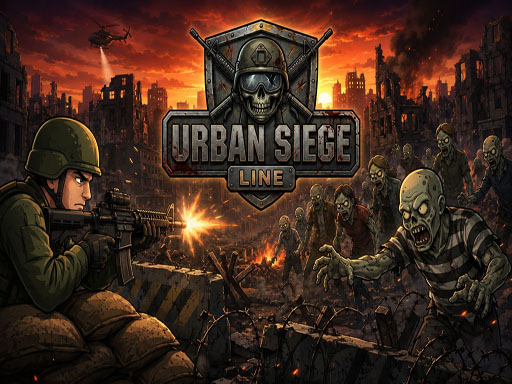
About Urban Siege Line
Urban Siege Line is a 2D action shooter where you defend a ruined city line against waves of zombies. Move between three lanes, shoot incoming enemies, switch weapons, call air support, deploy your support squad, throw grenades, upgrade your armory, and survive each mission.
Urban Siege Line belongs to the Shooting category and is best for quick reactions and arcade breaks. GamPlayer keeps this page useful with a large play screen, quick facts, reporting and related games.
How to play Urban Siege Line
- Press Play now or scroll to the game screen.
- Wait for the embedded game to load from GameMonetize.
- Use desktop use up and down arrow keys to change lanes press s to shoot press 1 2 and 3 to switch weapons press a for air support press d to deploy the support squad press f to throw a grenade press p or esc to pause mobile use the on-screen button.
- Use fullscreen if the game needs extra space.
Tips for a better session
- Read the first in-game screen for controls.
- Try fullscreen if the game feels cramped.
- Use related games if this one is close but not perfect.
 Shooting
 Shooting
 Shooting
 Shooting
 Shooting
 Shooting
 Shooting
 Shooting
 Shooting
 Shooting
 Shooting
 Shooting
 Shooting
 Shooting
 Shooting
 Shooting
 Shooting
 Shooting