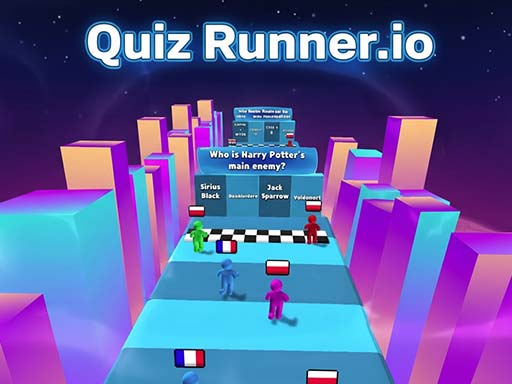
About Quiz Runner.io
Quiz Runner.io – Trivia & Multiplayer Quiz Battle Think fast, play smart, and rule the leaderboard in Quiz Runner.io, the ultimate online quiz game! Enjoy solo quiz mode to improve knowledge, custom quizzes to test your favorite topics, or upload your notes and PDFs to play interactive learning games. Join real-time multiplayer quiz battles, friend duels, and tournaments to compete globally. Track progress with levels, achievements, and power-ups. With daily quiz challenges, fast-paced timed games, smooth addictive gameplay, and support for 12+ languages, Quiz Runner.io is perfect for students, teachers, and trivia lovers worldwide!
Quiz Runner.io belongs to the Multiplayer category and is best for quick reactions and arcade breaks. GamPlayer keeps this page useful with a large play screen, quick facts, reporting and related games.
How to play Quiz Runner.io
- Press Play now or scroll to the game screen.
- Wait for the embedded game to load from GameMonetize.
- Use w rarr move forward a rarr move left d rarr move right double left-click mouse rarr move left or right.
- Use fullscreen if the game needs extra space.
Tips for a better session
- Read the first in-game screen for controls.
- Try fullscreen if the game feels cramped.
- Use related games if this one is close but not perfect.
 Multiplayer
 Multiplayer
 Multiplayer
 Multiplayer
 Multiplayer
 Multiplayer
 Multiplayer
 Multiplayer
 Multiplayer
 Multiplayer
 Multiplayer
 Multiplayer
 Multiplayer
 Multiplayer
 Multiplayer
 Multiplayer
 Multiplayer
 Multiplayer