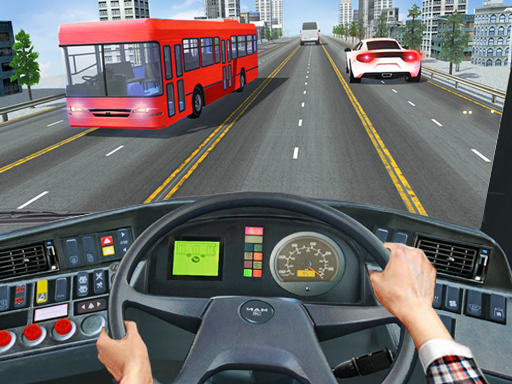
About Intercity Bus Driver 3D
In this Intercity Bus Driver 3D game, race on long freeway and enjoy the traffic coach bus driver missions in this bus driving games. Be quick because your passengers are waiting anxiously. Drive fast to the pick up spot, and then drop them to their destination which must be bus station of dofferent cities. Enjoy free world ride!
Intercity Bus Driver 3D belongs to the Racing category and is best for speed, driving and reaction practice. GamPlayer keeps this page useful with a large play screen, quick facts, reporting and related games.
How to play Intercity Bus Driver 3D
- Press Play now or scroll to the game screen.
- Wait for the embedded game to load from GameMonetize.
- Use wasd arrows - drive mouse to interact.
- Use fullscreen if the game needs extra space.
Tips for a better session
- Test acceleration and turning before chasing a perfect score.
- Fullscreen helps you see corners and obstacles earlier.
- Replay tracks to learn timing.
 Racing
 Racing
 Racing
 Racing
 Racing
 Racing
 Racing
 Racing
 Racing
 Racing
 Racing
 Racing
 Racing
 Racing
 Racing
 Racing
 Racing
 Racing