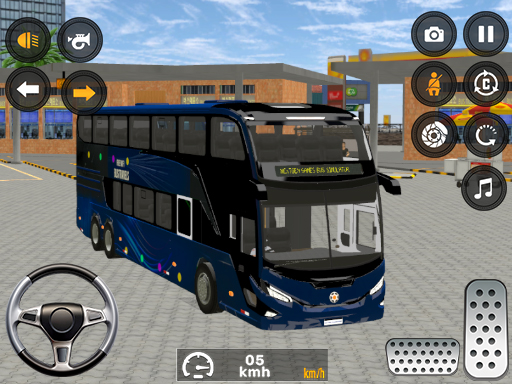
About City Coach Driving Games 3d
Start your journey in Easy Mode, featuring 5 engaging levels with 5 unique buses, each offering a different driving experience. Complete missions by picking up passengers from one location and safely dropping them off at their destination. Level 3 brings a special challenge with a night driving environment, where you must drive carefully in low visibility and ensure passenger safety. Game Features: Realistic city bus driving experience 5 unique buses to drive 5 challenging levels in Easy Mode Night driving mission (Level 3) Passenger pick and drop system Seat belt safety feature for immersive gameplay
City Coach Driving Games 3d belongs to the Adventure category and is best for family-friendly casual play. GamPlayer keeps this page useful with a large play screen, quick facts, reporting and related games.
How to play City Coach Driving Games 3d
- Press Play now or scroll to the game screen.
- Wait for the embedded game to load from GameMonetize.
- Use pc use wasd or arrow keys to drive mobile use on-screen buttons to control the vehicle on mobile use race button to accelerate and brake button to stop.
- Use fullscreen if the game needs extra space.
Tips for a better session
- Test acceleration and turning before chasing a perfect score.
- Fullscreen helps you see corners and obstacles earlier.
- Replay tracks to learn timing.
 Adventure
 Adventure
 Adventure
 Adventure
 Adventure
 Adventure
 Adventure
 Adventure
 Adventure
 Adventure
 Adventure
 Adventure
 Adventure
 Adventure
 Adventure
 Adventure
 Adventure
 Adventure