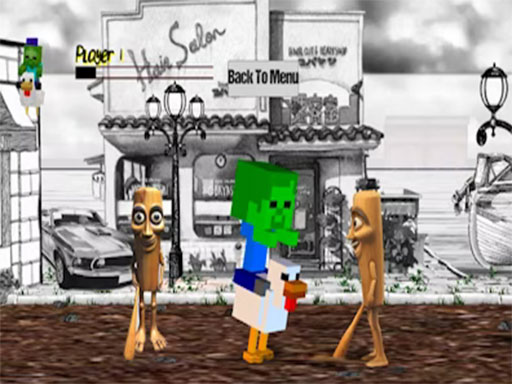
About Chicken Jockey Tung Tung Sahur Fight
Chicken Jockey: Tung Tung Sahur Fight is an outrageous beat ’em up game that throws you into the heart of chaotic, side-scrolling street battles — starring none other than the legendary Chicken Jockey, a baby zombie riding a fearless chicken. Inspired by classic arcade brawlers like Final Fight and Streets of Rage, this game adds a uniquely absurd twist by pitting your undead poultry-powered hero against a horde of brainrotted internet icons and local meme legends.
Chicken Jockey Tung Tung Sahur Fight belongs to the Adventure category and is best for quick reactions and arcade breaks. GamPlayer keeps this page useful with a large play screen, quick facts, reporting and related games.
How to play Chicken Jockey Tung Tung Sahur Fight
- Press Play now or scroll to the game screen.
- Wait for the embedded game to load from GameMonetize.
- Use arrow keys move z x c attack.
- Use fullscreen if the game needs extra space.
Tips for a better session
- Read the first in-game screen for controls.
- Try fullscreen if the game feels cramped.
- Use related games if this one is close but not perfect.
 Adventure
 Adventure
 Adventure
 Adventure
 Adventure
 Adventure
 Adventure
 Adventure
 Adventure
 Adventure
 Adventure
 Adventure
 Adventure
 Adventure
 Adventure
 Adventure
 Adventure
 Adventure