About Bridge Wars
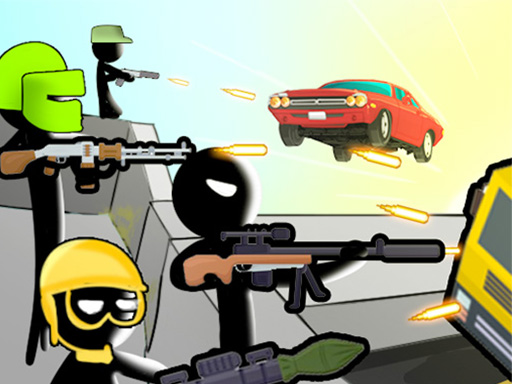
Gear up for Bridge Wars, a mobile gaming epic blending creativity and strategy. Immerse in a world where tactical mastery meets artistic flair. Draw patterns, summon stickman defenders in 3 seconds, facing relentless enemy vehicles. Upgrade characters, navigate intense environments, and stop foes from breaching. Embark on a thrilling adventure, showcasing tactical mastery against relentless waves! 1. Unlimited Levels 2. Customizable Characters and Weapons Skins 3. Power up Arsenal with shields and landmines and many more
Bridge Wars belongs to the Hypercasual category and is best for quick browser entertainment. GamPlayer keeps this page useful with a large play screen, quick facts, reporting and related games.
How to play Bridge Wars
- Press Play now or scroll to the game screen.
- Wait for the embedded game to load from GameMonetize.
- Use how to play bridge wars 1 draw a pattern to spawn your soldiers within 3 seconds 2 the soldiers spawned will attack the enemy vehicles who will try to cross the bridge full of barricades 3 visit the shop to upgrade your arsenal such as armor weapons.
- Use fullscreen if the game needs extra space.
Tips for a better session
- Read the first in-game screen for controls.
- Try fullscreen if the game feels cramped.
- Use related games if this one is close but not perfect.
 Hypercasual
 Hypercasual
 Hypercasual
 Hypercasual
 Hypercasual
 Hypercasual
 Hypercasual
 Hypercasual
 Hypercasual
 Hypercasual
 Hypercasual
 Hypercasual
 Hypercasual
 Hypercasual
 Hypercasual
 Hypercasual
 Hypercasual
 Hypercasual